This page needs JavaScript. For agents, the same page as Markdown: https://instabox.sh/blog/wake-on-use.md (below); the whole site: https://instabox.sh/llms.txt. # Paused Boxes Wake on Request https://instabox.sh/blog/wake-on-use.md 2026-10-26 · Tony Chang · Product An idle box pauses to a snapshot, and the next request wakes it up again. No start call needed. InstaBox now wakes a paused box when you use it. Just send it a request. We hold the request while the box wakes up, then pass it through. You don't need to start the box first. **When a box pauses** - **Free**: after 30 idle minutes. - **Pro and Team**: you pick 5 to 30 minutes, or turn it off. A box pauses after it has had no activity and no CPU load for the idle time above. When a request comes in, the box resumes from its memory snapshot, so your agent continues exactly where it left off. If a snapshot can't be restored, the box boots fresh from its disk instead: your files are kept, but running processes start over. **How it works** 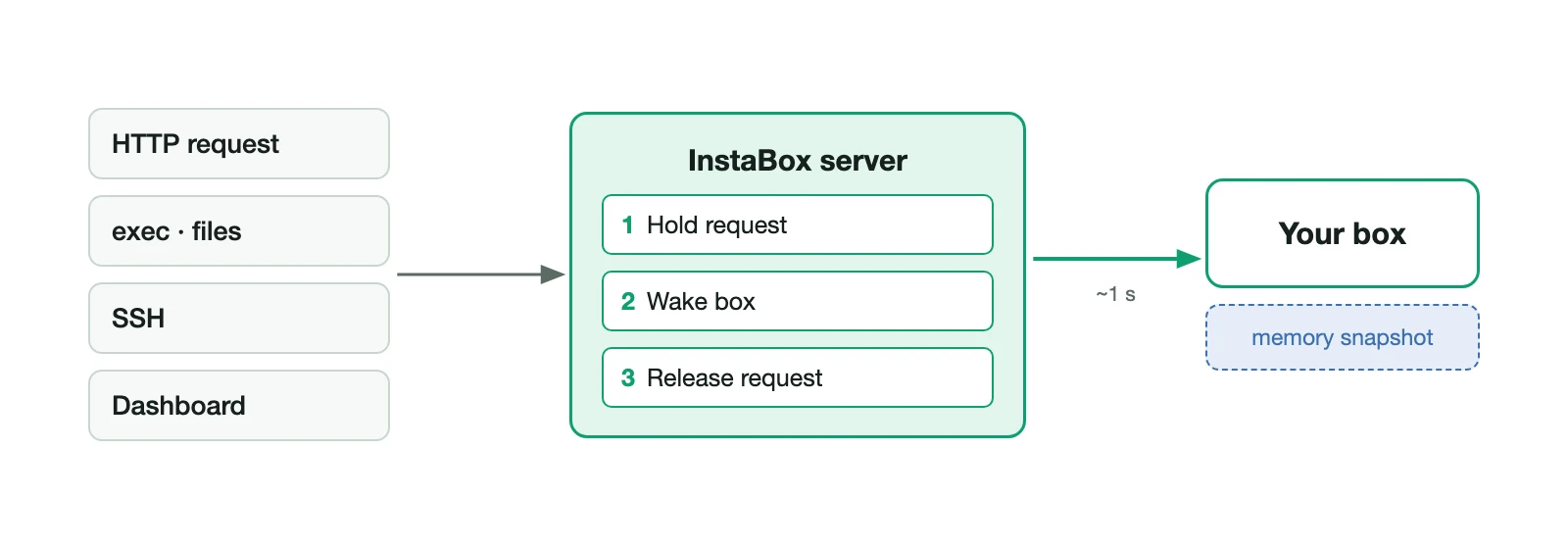 When a request reaches a paused box, the server holds it, resumes the box, then lets the request through. That works for an HTTP request to the box's public URL, an exec, a file read, an SSH connection or opening the box in the dashboard. A resume usually takes about a second, and the caller just sees a slightly slower response. To change the idle time, or wake a box before you need it: ```sh instabox auto-suspend my-box 10m instabox wake my-box ``` **If you paused it yourself** For now, a box you paused yourself stays paused, even when a request comes in. We're keeping it that way to prevent abuse and misuse. When you want it back, run `instabox resume my-box`. **Free boxes and long runs** A free box also pauses after 8 hours of continuous running, even if it's busy. It rests for a short cooldown first, then the next request wakes it as usual. We'd love to hear what you think! Email us at [support@instabox.sh](mailto:support@instabox.sh), or join our [Discord](https://discord.gg/instabox).