

runs-on: instabox-medium, or call the CLI from a step in any CI.
Run GitHub Actions jobs on InstaBox
1
Connect GitHub
On the dashboard’s CI page, click Connect GitHub.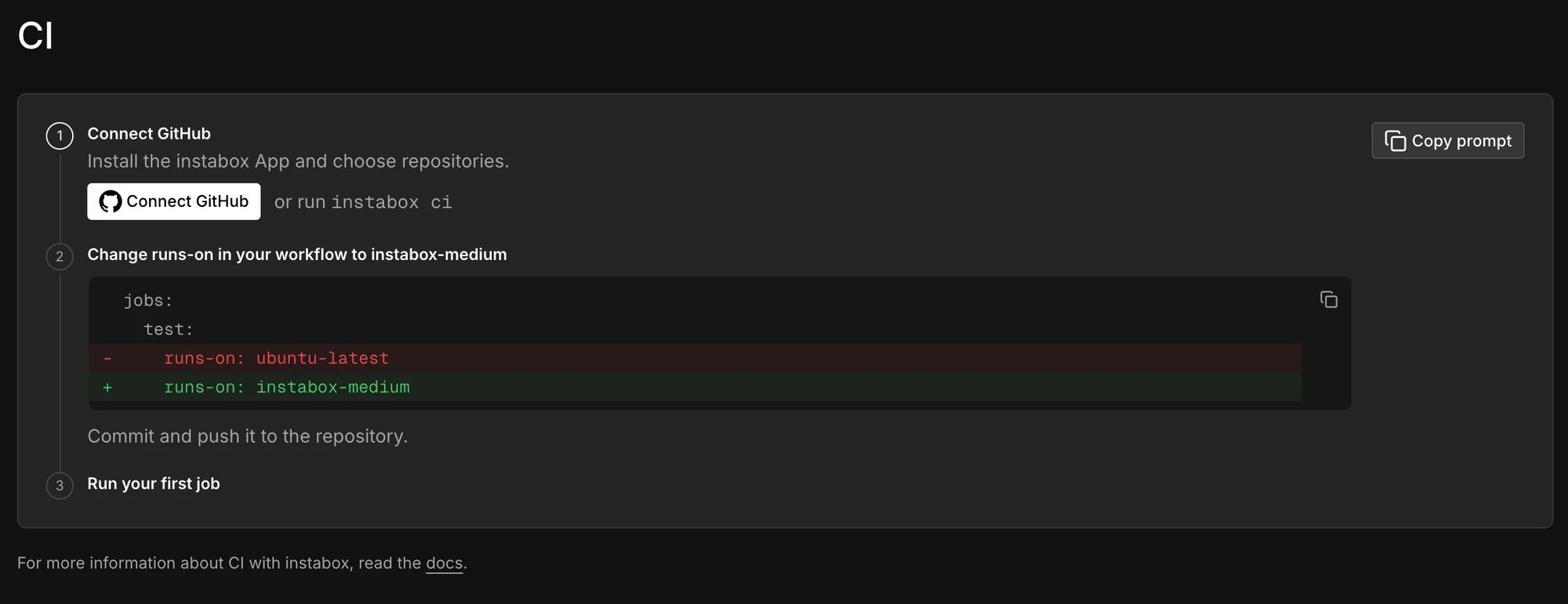
2
Change runs-on in your workflow
ubuntu-24.04 image. The
machine is deleted when the job ends. The image is built from GitHub’s runner-images release
ubuntu24/20261026.354, so tools and versions are those in its
Ubuntu 24.04 software list.
A job reads the release in $ImageVersion, and /usr/local/lib/instabox/ci/software-list prints
what its machine has.3
See your jobs
The dashboard’s CI page and
instabox ci list your jobs, and say why a job waits or was
refused. GitHub shows such a job only as queued.Not installed: Haskell, Swift, Julia, CodeQL, Edge, and Homebrew. The Android SDK is a trimmed one,
with a single NDK (27).
Start jobs from a snapshot
A job can start from a snapshot of your own instead of a fresh machine, so your repository, toolchain, and package caches are already there.1
Prepare a machine
Create a machine from the Clone your repository to
ci template and set it up as your jobs need it:~/work/<repo>/<repo> (where actions/checkout puts it), install
your toolchain, and fill your package caches.2
Save a snapshot
3
Name it in runs-on
Add This label is the job’s whole
-snapshot- and the snapshot’s name to the size label:runs-on: no size label, self-hosted, or other label next to
it. The size still sets vCPUs and memory, and storage is at least the snapshot’s. You can name
the snapshot by its ID too: instabox-medium-snapshot-sn_.... Only a job with this exact
runs-on can run on a machine from the snapshot.instabox ci and the dashboard’s CI page show which snapshot each job started from:
instabox ci, when the snapshot is not in the workspace
the GitHub App is linked to, is still saving or failed, or was not saved from a ci machine. It
never falls back to a fresh machine.
Snapshots work in private repositories only, with Run workflows from fork pull requests turned
off (the repository’s Settings > Actions > General). In a public repository, or one that runs
workflows from forks, jobs that name a snapshot are refused: a fork’s workflow could name the
snapshot too. If GitHub doesn’t answer instabox’s check, the job waits and is tried again.
What to put in the snapshot
What to put in the snapshot
The repository under
~/work, toolchains, and caches such as ~/.cargo/registry,
~/.npm, ~/.cache/pip, or ~/go/pkg/mod. Leave out secrets, and stop any services you
started before saving. A leftover runner registration or work directory does no harm: each
job’s runner gets its own registration.Keep it fresh
Keep it fresh
The snapshot keeps the GitHub Actions runner it was saved with, and GitHub stops sending jobs to
a runner more than 30 days behind its latest release. Save it again from a new
ci machine
at least once a month.Run the CLI from any CI
A step creates a machine, uploads the checkout, runs one command, and deletes the machine.1
Store an API key as a CI secret
INSTABOX_API_KEY and is not printed.2
Run the tests
npm ci && npm test stands for your own test command.-e NAME="$NAME". Pull requests from forks get no secrets, so the step
cannot run there.GitHub App permissions
What the GitHub App asks for
What the GitHub App asks for
The instabox GitHub App asks for these permissions:
The App asks for nothing on your code, pull requests, issues, or workflows.
Why Administration?
Why Administration?
GitHub lets an App add a runner to a repository only through Administration. Personal accounts
have no organization-level runners, so Administration is the only way to run their CI.
Don't want to grant it?
Don't want to grant it?
Call the CLI from any CI instead. It needs no GitHub App, only an API key. See
Run the CLI from any CI. On
Enterprise, we can set up a narrower App for your organization:
contact us.
API keys
Scopes and expiry for the key your CI uses.
CLI reference
instabox run and its exit codes.